Switch
Cisco 2960-S 10G - VLANs and port allocation
Hardware: Cisco 2960-S Managed Switch
Management: Console cable only (no web UI)
Role: Primary network gateway and firewall
Backup Located: None
No backups: As of now there are no backups for the main Cisco switch.
Subnet and VLANs
The network is segmented to isolate personal devices and publicly accessible servers.
| VLAN ID | Name | Subnet / Gateway | Description | Status |
|---|---|---|---|---|
| 10 | Personal | 192.168.10.0/24 |
Trusted personal devices - | Active |
| 20 | Servers | 192.168.20.0/24 |
Proxmox server cluster - used for both internet access and local communications. | Active |
| 25 | Core | 192.168.25.0/24 |
Core Server Layer for nodes to talk to each other | Active |
| 30 | Management | 192.168.30.0/24 |
Infrastructure management interface. | Active |
| 35 | Remote/GUI | 192.168.35.0/24 |
Remote access to the Proxmox hosts. | Active |
| 40 | Wireless | 192.168.40.0/24 |
Not used yet - Todo. | Not implemented |
| 50 | Evil and IOT Devices | 192.168.50.0/24 |
Stuff like AI or IOT device cheaper then it should be. | Not implemented |
| 999 | Hole (Native) | N/A | Blackhole VLAN to prevent VLAN hopping. | Shutdown |
| 123 | Parking | N/A | This does nothing but hold unused interfaces. | Shutdown |
| 100 | WAN | DHCP | I use the switch to take in RJ45 and turn into SFP+ for the Router. Has a SPAN Link for a soft TAP and general DPI. | Active |
Ports
| Port Range | Assignment | Mode |
|---|---|---|
| G1/0/1 - G1/0/4 | VLAN 10 (Personal) | Access - VLAN 10 |
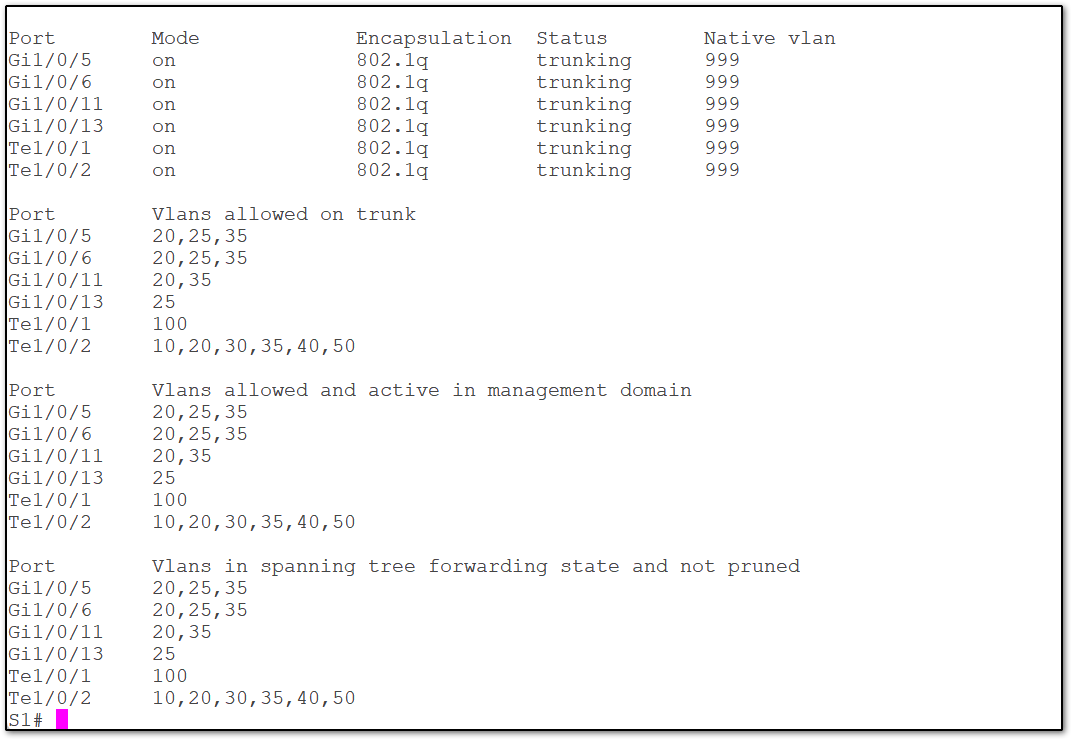
| G1/0/5 - G1/0/6 | VLAN 20,25,35 | Trunk (Allowed: 20,35,25) |
| G1/0/7 - G1/0/12 | VLAN 20 (Servers) | Trunk (Allowed: 20,35) |
| G1/0/13 - G1/0/20 | VLAN 25 (Core) | Trunk (Allowed: 25) |
| G1/0/21 | Parking (Unused) | Shut |
| Te1/0/1 | Router Link - Wan | Trunk (Allowed: 100) |
| Te1/0/2 | Router Link - Lan | Trunk (Allowed: 10, 20, 30, 35, 40, 50) |
| G1/0/22 | SPAN (Tap) | SPAN - Copy ISP Link (G1/0/23) |
| G1/0/23 |
ISP Link - Wan | Access - VLAN 100 |
| G1/0/24 |
(Management) | Access - VLAN 30 |
SPAN Port as a Soft Ethernet Tap
Internet traffic enters the switch via the ISP link (G1/0/23, access VLAN 100), passes through the switch to the 10Gb SFP+ port (Te1/0/1) toward the router’s WAN side, and returns via the second 10Gb port (Te1/0/2) as the LAN trunk.
The SPAN session is configured as VLAN-based, not interface-based.
The ports on the VLAN have been setup to be silent and not make any traffic. As in this role it only is copying traffic.
Known Issues / Notes
Spanning Tree (STP) / BPDU Guard
When the Netgate router reboots, its internal switch briefly acts unmanaged and passes Cisco BPDU packets from the LAN switch out to the WAN. This triggers BPDU Guard and shuts down the port.
Fix: The trunk port connected to the router requires
spanning-tree bpdufilter enableto prevent sending STP packets during this window. The router has changed since but this is still good practice.