Double NAT and Proxy Advantage
“Double NAT” has a bad reputation. It shows up on forums as the thing breaking your game console’s matchmaking, the reason your security camera app won’t connect, the mystery setting your ISP’s combo router hides from you. On a university network or behind CGNAT, a second layer of NAT usually means inbound connections are simply impossible - there is no public IP to forward a port on in the first place.
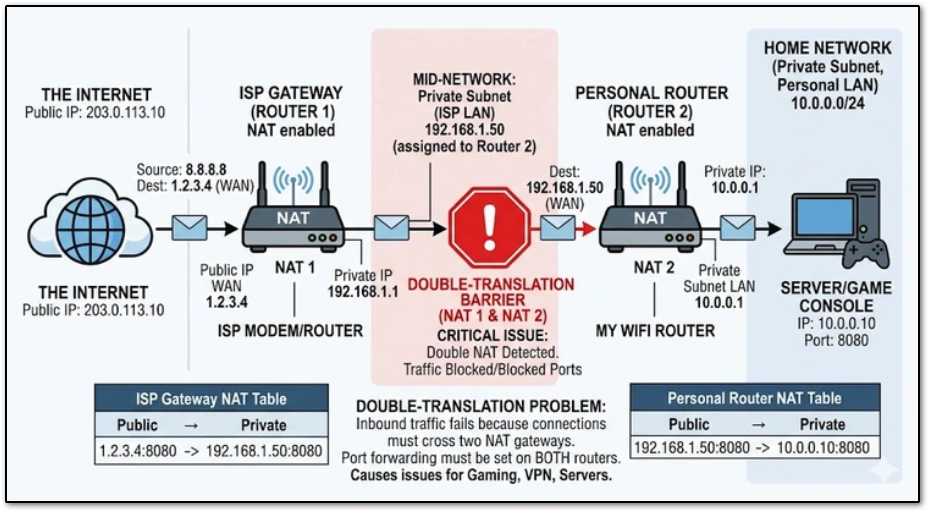
Double NAT happens when you have two routers connected in a row on the same network. It causes problems because the first router (the one connected directly to your ISP) acts as a firewall and blocks incoming connections meant for devices connected to the second router.
The Static Site and VPS Reverse Proxy posts both used this exact scenario as the justification for the architecture: a home server sits behind its own router doing NAT, and instead of fighting for a port forward, all traffic is tunneled out over WireGuard to a VPS, which does its own NAT/reverse-proxying back to the public internet. That is a second NAT boundary - and in my case it isn’t something I chose. The network this lab sits behind is double-NATed whether I like it or not. What’s different isn’t that the double NAT is deliberate; it’s that the architecture doesn’t just tolerate it, it turns the whole homelab into something that behaves like a single portable device. Plug it into any router, on any network, and it reconnects and every service comes back up right where it left off.
Turning a Liability Into a Design Pattern
Once you accept that inbound port forwarding isn’t an option, or isn’t desirable, the VPS-as-front-door model stops being a workaround and starts being an architecture with real advantages.
1. Flexibility
Every internal service gets its own subdomain instead of its own port forward. Looking at the current Caddyfile in VMs / Services, auth.nickloves.me, proxmox.nickloves.me, post.nickloves.me, and audio.nickloves.me all route through the same VPS to completely different machines and ports on the 192.168.20.0/24 server VLAN. Adding a new service is a few lines in a Caddyfile and a container restart - no router configuration, no new forwarded port, no coordination with an ISP-controlled gateway.
2. Portability
The public identity of every service lives on the VPS, not on the home network. The WireGuard tunnel is the only thing that has to know where “home” currently is, so the whole homelab ends up behaving like a single device instead of fixed infrastructure. Unplug it, carry it somewhere else, plug it into a completely different router, and as soon as the tunnel finds its way back to the VPS every subdomain, certificate, and service is live again - DNS, SSL, and every route stay exactly as they were. Nothing downstream needs to know or care that the network underneath it changed.
That matters because who controls the network a homelab is plugged into isn’t always up to the person running it:
- A student in a dorm. University networks are almost universally double-NATed by design - IT hands out a private address behind a shared campus gateway, port forwarding isn’t offered, and it’s not something a student is in a position to ask for. The double NAT here isn’t a choice; it’s just what the network does.
- An employee or hobbyist who wants portability without asking permission. Someone running a lab behind a work network, a family network, or a different apartment every year doesn’t want to renegotiate router config - or explain to IT, or to family, why a port needs forwarding - every time it moves. Treating the upstream network as opaque and untrusted means the lab works the same way on a coffee shop router as it does at home.
Neither of these is “choosing” a double NAT for its own sake - the NAT is just whatever the upstream network happens to do. What’s actually being chosen is not depending on that network for anything beyond an outbound connection.
That’s really the underlying point: you don’t need control over a network to have working inbound connections through it. The WireGuard tunnel is initiated outbound from the home server, which almost every network permits by default, dorms and locked-down office LANs included. The VPS is the only thing that ever has to accept an inbound connection, and it’s a box that’s fully controlled. The practical effect - stable, reachable, certificate-backed services - looks like controlling the network, without ever needing admin rights on the network actually being used.
3. Security
The home router never has an open inbound port and never appears in Shodan-style scans - the VPS absorbs 100% of the public attention. Even if the VPS is compromised, the attacker lands in a disposable, stateless box with no data on it, not on the VLAN holding Proxmox, the ARR stack, or backups.
Docker complicates this on the VPS side - as noted in the VPS Reverse Proxy post, Docker rewrites
iptablesdirectly and bypasses UFW. The VPS being “sacrificial” doesn’t mean it’s unimportant to harden; it means a compromise there is a contained, rebuildable event instead of a breach of the actual lab.
4. Lab Environment vs. Deployment Environment
The VPS is the stable, boring, “deployment” surface. The homelab behind it is free to be an actual lab: switches get rebooted, VLANs get restructured, and per the To-Do list, things like basic red-team exercises against the internal network are on the roadmap. None of that risks the public-facing endpoint, because the public-facing endpoint isn’t in the same failure domain. Breaking something at home just means a Caddy site returns a 502 until the tunnel or container comes back - it doesn’t expose anything new to the internet in the process.
The Cost: Added Complexity
None of this is free. A single home router doing NAT and port forwarding is one device, one config, one thing to debug. This architecture is at minimum three: the VPS, the WireGuard tunnel, and the home server - each with its own logs, its own failure modes, and its own way of quietly being the problem.
A few specific costs worth calling out:
- Extra hop, extra latency. Every request now travels client → VPS → tunnel → home server and back, instead of client → home server directly.
- MTU problems. WireGuard’s overhead shrinks the effective MTU of everything riding through the tunnel. The Overview doc sums this up as bluntly as possible: “MTU likes to break stuff watch out for it.”
- Tunnel state is now a dependency. If the WireGuard handshake doesn’t stay alive, every service behind it goes dark at once, even though each one is otherwise healthy. The
PersistentKeepalivesetting covered in the VPS Reverse Proxy post exists specifically to fight this. - Debugging gets a layer. A 502 could mean the container crashed, the tunnel dropped, or Caddy can’t reach the internal IP - three places to check instead of one.
Traditional Port Forward vs. VPS Proxy Architecture
| Port Forward | VPS + WireGuard Proxy | |
|---|---|---|
| Works behind CGNAT / university double NAT | No | Yes |
| Home IP exposed publicly | Yes | No |
| Adding a new service | Router config change | Caddyfile + container |
| Moving to a new location | Re-forward every port | Update one tunnel peer |
| Failure domains | 1 | 3+ |
| Latency | Direct | +1 hop minimum |
Double NAT is still something that happens to you - a dorm, an office, a family router, none of it chosen. What’s different is that this architecture doesn’t need the upstream network’s permission to work, so it doesn’t matter which network it happens to be. Like every other piece of infrastructure in this lab, the complexity it adds has to be worth the portability and control it buys back.